Box Packaging 3D Mockup Die-Cut: A Practical Evaluation for Designers and Businesses
When you are developing packaging for a product, visualising how your design will look in the real world is essential. A Box Packaging 3D Mockup Die-Cut is a specialised tool that helps you preview a package’s appearance and structural integrity before committing to physical production. Unlike simple flat mockups, a die-cut 3D version accounts for the actual cutting, folding, and assembly lines, giving a more accurate representation of the finished box. This article evaluates the practical value of using such mockups, helping you decide whether they align with your project goals, resources, and workflow.
What Is a Box Packaging 3D Mockup Die-Cut?
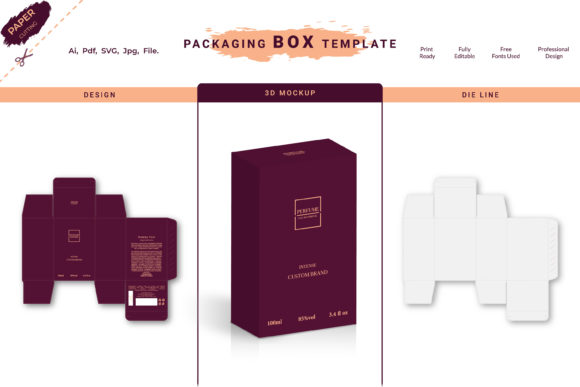
A Box Packaging 3D Mockup Die-Cut is a digital or physical representation of a box that incorporates the precise cutting and scoring lines used in manufacturing. In a digital context, it is often a layered Photoshop or Illustrator file that allows you to place your artwork onto a three‑dimensional template. The “die‑cut” aspect means that the mockup includes the exact shape and crease lines, showing where the box will be cut out of a flat sheet and where it will fold. This is fundamentally different from a simple perspective mockup, which may only show a rectangular box without structural details. For physical mockups, the die‑cut refers to a pre‑cut flat sheet that you can fold to form a prototype.
Whether you are a graphic designer presenting concepts to a client, a packaging engineer testing a new structure, or a brand owner evaluating shelf presence, this type of mockup bridges the gap between a computer screen and a tangible product. The level of detail can range from a basic white box with fold lines to a fully rendered 3D scene with shadows, reflections, and realistic materials.
Why Consider a Die-Cut Mockup for Your Packaging?
Interest in a Box Packaging 3D Mockup Die-Cut usually arises from the need for accuracy. When you design a box, the print and fold lines are critical. A standard 3D mockup might distort or omit these, leading to misunderstandings during production. Die‑cut mockups solve that by maintaining the true proportions and fold logic of the package. Here are common reasons why people turn to them:
- Realistic presentation – Clients and stakeholders can see exactly how the graphics align with panels, flaps, and edges.
- Error detection – You can catch misalignments, overlapping artwork, or structural issues before sending files to the printer.
- Cost savings – Avoiding a bad print run by catching problems early saves both time and money.
- Better communication – Die‑cut mockups provide a common visual reference between designers, printers, and marketing teams.
- Marketing assets – High‑quality 3D renders of the box can be used for e‑commerce listings, social media, or advertising before physical samples exist.
For many professionals, the decision to use a die‑cut mockup comes down to reducing uncertainty. If your packaging involves complex shapes, multiple panels, or job‑specific fold patterns, a generic mockup may not suffice.
Precision in Structural Representation
The most significant benefit of a Box Packaging 3D Mockup Die-Cut is structural accuracy. Because die‑cut lines define the actual cut and crease paths, the mockup respects the box’s true geometry. For example, a tuck‑end carton will have specific flap lengths and lock tabs; a die‑cut mockup will show these correctly, whereas a simple box mockup may scale or skew them. This precision is vital when your design relies on precise alignment of graphics with seams or when you are testing a new structural design that requires careful tolerances.
Streamlined Design Iteration
Using a die‑cut digital template allows you to swap artwork quickly and see the result in 3D. Many designers keep a library of common box styles (like straight tuck, reverse tuck, or gable boxes) in die‑cut format. This makes it easy to generate multiple concepts for client review. For physical prototyping, a die‑cut flat sheet can be folded in minutes, enabling rapid iteration without waiting for a full production run.
Enhanced Client and Stakeholder Buy‑In
A realistic die‑cut 3D mockup often communicates more effectively than flat annotations. When a client sees a box rendered with shadows, reflections, and proper fold lines, they gain confidence that the final product will match expectations. This is particularly helpful when the packaging has unusual dimensions or custom inserts.
Tradeoffs and Limitations to Keep in Mind
No tool is perfect, and Box Packaging 3D Mockup Die-Cut solutions come with tradeoffs. Understanding these helps you decide when they are worth the effort and when simpler approaches may be acceptable.
- Learning curve – Using layered die‑cut templates in software like Adobe Photoshop or Illustrator requires familiarity with smart objects, layer masks, and sometimes 3D rendering tools. For beginners, the initial setup can be time‑consuming.
- Physical production costs – If you opt for physical die‑cut prototypes, you may need to purchase custom dies for unique box shapes, which adds expense for one‑off designs. For standard box styles, pre‑made physical die‑cut templates are available, but they may not fit your exact dimensions.
- Rendering limitations – Digital die‑cut mockups still rely on computer graphics. Ambient occlusion, realistic texture, and lighting need careful adjustment to avoid an artificial look. Overly perfect renders can sometimes mislead about how the box will perform under real conditions (e.g., paper curl, glue residue).
- File size and performance – High‑resolution 3D mockup files can be large and slow to work with, especially if you are applying complex artwork to multiple sides. This may be a consideration if you are on older hardware.
- Overconfidence – A beautiful die‑cut mockup can sometimes make a design look more finished than it is. It is important to remember that the mockup shows the ideal version; real production variations in paper thickness, printing registration, and folding accuracy can alter the final result.
Situations Where Die-Cut Mockups Excel
A Box Packaging 3D Mockup Die-Cut is a strong fit in several common scenarios:
New product launches with custom packaging. When you are developing a unique box shape for a premium product, accuracy is paramount. Die‑cut mockups let the team test structural integrity and visual appeal simultaneously. For example, a subscription box with a magnetic lid or a luxury cosmetic carton with windows and inserts benefits from a die‑cut prototype to confirm that all components fit.
Client presentations for packaging design services. If you are a designer pitching to a brand, a die‑cut 3D mockup demonstrates professionalism and attention to detail. It helps the client visualise how their logo and product information will appear on each panel, reducing the need for back‑and‑forth corrections later.
E‑commerce product page creation. Many online retailers require multiple product images, including packaging shots. A digital die‑cut mockup can generate photorealistic images without needing a physical sample, speeding up time‑to‑market. You can also adjust colours or branding elements easily if the product packaging changes before launch.
Testing print alignment and fold tolerances. For packaging that requires precise registration—such as a design that wraps around the entire box with minimal margins—a die‑cut mockup helps identify potential shifts. You can simulate how different paper thicknesses affect the fold and adjust the artwork accordingly.
When Alternatives May Be Worth Considering
While die‑cut mockups are powerful, there are situations where simpler or different approaches may be more appropriate:
Simple rectangular boxes with standard dimensions. If your packaging is a basic straight‑tuck carton with no special structural features, a generic 3D mockup (without die‑cut details) may be sufficient for most internal reviews. The added precision of die‑cut lines may not deliver enough value to justify the extra effort in template setup.
Early conceptual brainstorming. When you are rapidly exploring ideas in the early stages, paper sketches or low‑fidelity wireframes can be faster. Investing time in a detailed die‑cut mockup for a concept that may be discarded can slow the creative process. Use simple mockups first, then refine with die‑cut versions when the design is more settled.
Budget constraints for physical prototyping. If your company has strict budget limits and you only need to show a rough idea of the packaging, a straightforward printed flat sheet or a basic foldable template (without custom die) may be enough. Some printers offer free or low‑cost standard die‑cut templates that you can download and fold. That can be a middle ground.
Highly complex packaging with multiple materials. For boxes that incorporate plastic windows, foil stamps, or unusual coatings, a die‑cut mockup (digital or physical) may not fully capture the material properties. In such cases, a prototype from the actual material is more reliable. The die‑cut mockup still serves as an intermediate validation step, but final decision‑making should involve a real sample.
Decision-Making Insights for Choosing the Right Mockup Approach
To determine whether a Box Packaging 3D Mockup Die-Cut is right for your project, ask yourself the following questions:
- What is the end goal? – If you need to communicate structural details (fold lines, flaps, tabs) to a printer or engineer, die‑cut is essential. If you just need a general visual impression, a non‑die‑cut mockup may be adequate.
- How complex is the box structure? – Unusual shapes, asymmetric flaps, or multiple lock and tuck mechanisms benefit from die‑cut accuracy. Standard rectangular boxes can often use generic mockups.
- What is your turnaround time? – Digital die‑cut mockups can be prepared quickly if you have templates ready, but physical custom die‑cut sheets require lead time. Balance speed against the need for precision.
- Who is the audience? – For presentations to non‑technical stakeholders, a visually polished die‑cut 3D render can be persuasive. For internal engineering teams, flat die‑cut diagrams may be more useful.
- What is your budget per mockup? – Custom die‑cut physical prototypes cost more per unit than generic ones. If you need many variations, digital die‑cut mockups are more cost‑effective.
- How close are you to production? – Early design phases allow for less precise mockups. As you approach final tooling and printing, die‑cut mockups provide necessary validation.
By weighing these factors, you can choose the level of mockup fidelity that matches your current stage of design and business needs. It is often wise to begin with simple mockups and upgrade to die‑cut versions when the design becomes final or when you require sign‑off from stakeholders who rely on structural accuracy.
Ultimately, a Box Packaging 3D Mockup Die-Cut is a practical tool that reduces risk and improves communication. It is not a magic bullet—every mockup remains an approximation of the real product. But when used in the right context, it can save significant time, money, and frustration, especially for packaging that goes beyond a basic rectangle. By understanding its strengths and limitations, you can integrate die‑cut mockups into your workflow with confidence, knowing exactly when they add value and when a simpler approach will do.