How to Use a Purple Editable 3D Text Effect in Your Design Workflow
Typography is one of the most powerful tools in visual communication. When you add depth, color, and dimensionality to text, you move beyond simple readability and enter the realm of visual impact. A purple editable 3D text effect sits at the intersection of creative flexibility and practical utility. It gives designers, marketers, and content creators a way to produce striking headlines, logos, or callouts without rebuilding the effect from scratch every time. Understanding how to integrate this asset into your broader workflow can save hours of repetitive work and elevate the consistency of your output.
What a Purple Editable 3D Text Effect Actually Is
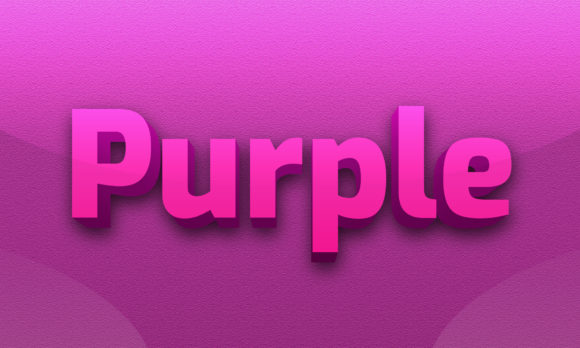
At its core, a purple editable 3D text effect is a pre-built style or layer setup that applies a three-dimensional appearance to text, with purple as the dominant color theme. The term "editable" is the key differentiator. Unlike a rasterized image or a static graphic, an editable effect allows you to change the text, adjust the color, tweak the depth, and modify lighting or shadow parameters without losing the original structure. This means you can reuse the same effect across multiple projects, adapting it to different contexts while maintaining a consistent visual identity.
In practical terms, this effect is typically delivered as a layer style in Photoshop, a set of smart objects in Illustrator, a CSS stack for web use, or a template in motion design tools like After Effects. The purple palette can range from deep violet to soft lavender, and the 3D effect may include bevels, extrusions, shadows, highlights, and surface textures. When you understand the underlying mechanics, you can bend the effect to fit your specific needs rather than forcing your project to fit the effect.
Where It Fits in a Broader Creative Process
A purple editable 3D text effect is not a standalone solution. It is a component that fits into a larger sequence of planning, design, production, and delivery. Thinking of it as a modular resource rather than a finished piece helps you use it more strategically.
During the planning phase, you might decide that a 3D text treatment is appropriate for a hero section, a product name, or a key message. The choice of purple signals something specific: creativity, luxury, mystery, or spirituality depending on the shade and context. By having an editable effect ready, you can mock up multiple variations quickly without committing to a final version. This speeds up the decision-making process and lets you test different color intensities or depth levels against your background imagery.
In the execution phase, the effect integrates directly into your design software. You apply it to your text layer, adjust the wording, and fine-tune the lighting angle to match the scene. Because it is editable, you can also combine it with other effects like gradients, glows, or texture overlays. The purple 3D text becomes one layer in a composite that may include photography, vector graphics, or UI elements. This layered approach keeps your file organized and non-destructive, which is essential when you need to revisit a project months later.
After the project is delivered, the same effect can be archived and reused. If you maintain a library of editable text effects, you can pull the purple 3D style into future work with minimal adjustment. This creates a feedback loop where each project improves your resource library, and each new project starts with a head start.
Using the Effect Before, During, and After a Project
The flexibility of an editable 3D text effect means it can serve different purposes at different stages of your workflow. Understanding this can help you plan your time and resources more effectively.
Before the Project: Preparation and Prototyping
In the preparation stage, you are often gathering assets, defining style guides, and creating mood boards. A purple editable 3D text effect can function as a style anchor. You can apply it to placeholder text to see how the color and dimensionality interact with your chosen fonts, backgrounds, and overall composition. This is especially useful when pitching concepts to clients or stakeholders. Instead of describing a visual idea, you show it in a realistic form. Because the effect is editable, you can quickly swap the text to match different brand names or taglines without redoing the mockup.
Preparation also involves technical checks. You need to confirm that the effect works with your software version, that the color profile matches your intended output, and that the 3D parameters are compatible with your rendering engine. Testing these factors early prevents surprises later in the production timeline.
During the Project: Core Production and Iteration
When the project is in full production, the editable nature of the effect becomes a productivity multiplier. You can make changes on the fly. If a client decides to change a headline from "Luxury Collection" to "Premium Line," you update the text layer and the 3D effect follows automatically. No need to recreate shadows, extrusions, or highlights. This keeps the workflow fluid and reduces the friction that often accompanies late-stage revisions.
Iteration is another area where this effect shines. You might try different purple shades, adjust the depth to make the text pop more subtly or dramatically, or rotate the lighting to match a new background. Because each parameter is adjustable, you can generate a dozen variations in minutes and compare them side by side. This ability to experiment without penalty encourages better design decisions.
After the Project: Archiving, Repurposing, and Scaling
Once a project is complete, the purple editable 3D text effect can be saved as a reusable asset. If you document the settings used, including font family, color hex values, depth settings, and lighting angles, you can replicate the same style in future projects with precision. This is invaluable for brands that maintain a consistent visual language across multiple campaigns.
Beyond archiving, you can repurpose the effect for different media. A 3D text style created for a print ad can be adapted for a social media graphic, a video intro, or a website hero section, provided you adjust the resolution, color space, and output format accordingly. The editable foundation makes these adaptations straightforward rather than requiring a full rebuild.
How It Interacts with Other Tools, Resources, and Decisions
No design asset exists in isolation. A purple editable 3D text effect interacts with your choice of fonts, the color palette of the surrounding design, the lighting conditions of the scene, and the capabilities of your software. Recognizing these interactions helps you use the effect more intentionally.
Font selection matters significantly. A bold sans-serif typeface will carry the 3D effect differently than a delicate serif or a handwritten script. Testing a few font families with the same effect settings can reveal which combinations produce the desired level of readability and visual interest. Similarly, the purple hue should complement or contrast with the background colors in a way that maintains accessibility and legibility.
Lighting and shadow settings within the effect need to align with the lighting in your overall composition. If your background image has a light source from the top left, the 3D text shadows should follow the same direction. Many editable effects come with adjustable light angles, so you can match them to your scene. Ignoring this alignment can make the text feel disconnected and artificial.
Software compatibility is another consideration. If you work in a team that uses a mix of design tools, you need to choose an editable 3D text effect format that translates well across applications. Smart objects in Photoshop are portable within the Adobe ecosystem, but they may not open natively in Figma or Sketch. In those cases, you might need a CSS-based approach or a vector export. Planning for these interactions upfront prevents workflow bottlenecks.
Practical Implementation Tips and Workflow Examples
To get the most out of a purple editable 3D text effect, you need to incorporate it into your daily routine in a way that feels natural, not forced. Here are some practical tips and workflow examples drawn from real usage scenarios.
Tip 1: Create a Master File with Multiple Variations
Instead of keeping a single version of the effect, build a master file that contains several purple variations: one deep and dramatic, one bright and playful, one soft and metallic. Label each clearly. When you start a new project, duplicate the master file and hide the variations you do not need. This gives you a library of starting points and reduces the time spent tweaking settings from scratch.
Tip 2: Combine with Layer Comps for Rapid Prototyping
In Photoshop or similar software, use Layer Comps to save different states of your 3D text. One comp might show the text with a dark purple and strong extrusion, another with a lighter shade and softer bevel. You can cycle through these comps during client presentations to gather feedback instantly. This approach turns the effect into a decision-support tool rather than just a decorative element.
Tip 3: Pair with Neutral Backgrounds for Maximum Impact
Purple 3D text can be visually dense, especially when shadows and highlights are involved. Placing it on a neutral or desaturated background helps the text command attention without competing elements. A simple gradient or a softly blurred photograph often works well. Test the effect on at least three different background styles before finalizing a layout.
Tip 4: Adjust Depth Based on Output Medium
The level of 3D depth that works on a large poster may look overwhelming on a mobile screen. When repurposing the same effect across media, adjust the extrusion depth and shadow spread. For small formats, reduce the depth to maintain clarity. For large formats, you can amplify the depth to create a more dramatic presence. Editable effects make these adjustments trivial because the parameters remain accessible.
Workflow Example: Social Media Campaign
Imagine you are producing a week-long social media campaign for a product launch. The brand uses purple as its accent color. You build a purple editable 3D text effect for the campaign tagline and save it as a smart object. Each day, you open the master file, change the text to match the daily post, adjust the background image, and export. The 3D effect remains consistent across all posts, reinforcing brand recognition. Without the editable effect, you would have to recreate the text style seven times, increasing the risk of inconsistency and wasting hours.
Workflow Example: Video Title Sequence
For a video project, you need a title sequence that features a purple 3D heading. You apply the editable effect in After Effects, adjust the text to the episode title, and animate the depth or rotation slightly for visual interest. Because the effect is editable, you can reuse the same composition for every episode, simply updating the text layer. This cuts production time for each episode and ensures a uniform look across the series.
Preparation, Compatibility, and Usability Considerations
Before you commit to a purple editable 3D text effect as a regular part of your workflow, take time to evaluate a few practical factors. Preparation here means not just technical setup but also mental readiness to incorporate the effect into your process without overusing it.
Compatibility starts with your software environment. Check that the effect file matches your version of Photoshop, Illustrator, After Effects, or your chosen tool. If you work with team members who use different versions, test the file on their systems early. Also consider color management: purple can shift dramatically between RGB and CMYK, so if your output includes print, verify the color profile and adjust the purple values accordingly.
Usability is about how easily you can modify the effect without breaking it. Good editable effects are built with non-destructive techniques: adjustment layers, smart objects, and linked assets. If the effect relies on rasterized layers or hard-coded values, it will be less usable in the long run. When acquiring or building an editable 3D text effect, inspect the layer structure. The more modular and well-labeled the layers, the easier it is to make changes quickly.
Organization matters for long-term use. Maintain a dedicated folder in your asset library for text effects, and within that folder, subfolders by color or style. Name your files with enough detail that you can find them later without opening each one. For example, "Purple_3D_Bold_Depth20.ai" is more useful than "TextEffectFinal_v3.ai." A small investment in naming consistency pays off when you are under deadline pressure.
Long-Term Use and Quality Control
An editable 3D text effect should age well. As you update your software, the effect may behave differently. Test it after major updates to ensure that the 3D rendering engine still processes the parameters as expected. If you notice artifacts or changes in appearance, adjust the settings or rebuild the effect using the newer tools. Keeping a changelog or notes file alongside the effect can help you track what works and what does not over time.
Quality control also involves monitoring how the effect performs across different outputs. A purple that looks vibrant on your calibrated monitor may appear dull in a web browser or muddy in print. Use soft proofing in your design software to preview the effect under different output conditions. If you frequently publish to both digital and print, consider creating two versions of the effect, one optimized for RGB and one for CMYK, with the same visual intent but adjusted color values.
Finally, guard against overuse. A purple editable 3D text effect is a powerful tool, but using it in every project can make your work feel formulaic. Rotate it with other text treatments, flat typography, and hand-lettered styles to keep your portfolio fresh. The goal is to have the effect in your toolkit, ready when it serves the message, not to force it into every layout.
When you treat a purple editable 3D text effect as a flexible, reusable component of a larger design system, you gain speed, consistency, and creative freedom. It stops being a standalone gimmick and becomes a practical asset that supports your real work: communicating ideas clearly and memorably. Whether you are a solo freelancer, a marketing team of one, or a small business owner handling your own visuals, this kind of resource lets you produce polished typography without starting from zero every time. The effort you put into setting it up correctly the first time pays dividends in every project that follows.