Green 3D Text Effect: Adding Depth and Eco-Conscious Style to Your Visual Content
In a digital landscape saturated with flat design and minimalist typography, there is something refreshingly bold about text that seems to leap off the screen. The Green 3D Text Effect is not merely a visual gimmick — it is a deliberate design choice that marries depth and dimension with a color palette that evokes nature, sustainability, and vitality. Whether you are designing a logo, a social media graphic, a website hero section, or a presentation slide, this effect can transform ordinary words into a tactile, memorable experience. But what exactly is it, and why should you consider using it? Let's explore the essence, applications, and practical nuances of the Green 3D Text Effect.
What Is the Green 3D Text Effect?
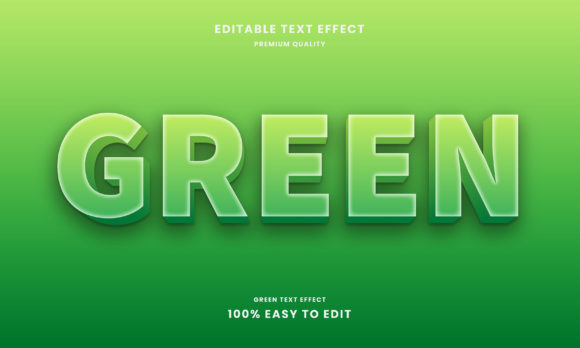
At its core, the Green 3D Text Effect is a typographic treatment that applies three-dimensional depth, shadowing, and often lighting to text characters, using shades of green as the primary or accent color. The result is text that appears to pop outward or recede inward, creating a sense of physical presence on a flat screen. This effect can range from subtle embossing to dramatic extrusion, and the green palette can vary widely — from deep forest tones to bright lime accents, from muted sage to vibrant emerald.
The effect typically combines several visual elements:
- Depth layers that simulate thickness, often using darker greens for shadows and lighter greens for highlights.
- Lighting and shading that create the illusion of a light source hitting the text from a specific angle.
- Bevel or contour edges that give the letters a rounded or sharp 3D appearance.
- Background contrast that helps the green stand out, often using neutral dark or light backdrops.
Unlike simple flat green text, the 3D version invites the viewer to "feel" the letterforms. It is a tool for grabbing attention and conveying a sense of substance, reliability, and creativity.
Who Benefits from Using This Effect?
The Green 3D Text Effect is surprisingly versatile. It appeals to a wide range of users, each with distinct goals:
Business Owners and Brand Managers
If your brand is rooted in sustainability, eco-friendliness, nature, health, or growth, green is already a natural choice. Adding 3D depth elevates your logo or headline from a simple mark to a statement of solidity and forward-thinking design. A green 3D headline on a landing page can communicate both environmental consciousness and modern professionalism.
Graphic Designers and Creatives
For designers, the effect is a playground for experimentation. It can be used in posters, flyers, digital art, and mockups to create a sense of energy and dimension. The green palette allows for organic, earthy combinations or bold, unnatural neons, depending on the project's tone.
Content Creators and Social Media Managers
In a crowded feed, static text often gets ignored. A Green 3D Text Effect in a thumbnail, story, or reel cover can stop the scroll. It signals that the content is worth pausing for — especially when paired with themes like nature, finance, growth, or wellness.
Educators and Presenters
Presentations and educational materials benefit from visual hierarchy. Using 3D green text for key takeaways or section titles adds emphasis without relying on loud animations. It helps learners remember the key points by making them visually distinct.
Website Owners and UX Designers
When used sparingly, 3D text can enhance call-to-action buttons, testimonial highlights, or hero section titles. It adds a tactile quality that flat design sometimes lacks, making the user experience feel more engaging and human.
Where Can You Use Green 3D Text?
The applications are broader than you might think. Here are ten real-world scenarios where the Green 3D Text Effect shines:
- Logo designs for eco-brands, organic farms, or green tech startups.
- Website hero headlines that need to make an immediate impact.
- Social media graphics for Earth Day, sustainability campaigns, or product launches.
- Presentation slides for environmental conferences or business sustainability reports.
- Product packaging mockups, especially for natural or organic goods.
- YouTube thumbnails and video title overlays for green lifestyle channels.
- Event posters for green festivals, plant sales, or eco-conscious workshops.
- Email headers for newsletters focused on sustainability or green living.
- Mobile app splash screens where the brand identity centers on nature.
- Infographic titles where you want to lead the eye and establish a theme.
Strengths of the Green 3D Text Effect
Why choose this specific effect over other typographic treatments? The strengths are rooted in both psychology and aesthetics:
- Attention-grabbing: The combination of green's natural appeal and 3D's depth creates a powerful focal point.
- Memorable branding: Green is associated with growth, renewal, and trust. 3D adds permanence and substance to that association.
- Versatility: From dark forest greens to bright neons, the effect adapts to formal, playful, or earthy tones.
- Cross-platform effectiveness: It works on screens, print, and even in video, maintaining its impact across media.
- Emotional resonance: Green is calming yet invigorating. 3D adds a layer of modern sophistication.
Considerations and Limitations
No design tool is perfect for every situation, and the Green 3D Text Effect has its nuances. Understanding these will help you use it effectively:
Readability Can Suffer
When shading and depth are too aggressive, the text can become hard to read, especially at small sizes. This is particularly problematic for body text or complex fonts. The effect is best reserved for headlines, short phrases, or logos.
Color Contrast Matters
Green can be tricky against certain backgrounds. Dark greens on black backgrounds get lost, while bright greens on white can feel harsh. Testing contrast is essential, and using a complementary background — like a soft neutral, deep blue, or warm gray — often yields the best results.
Not Suitable for All Brand Identities
Luxury or formal brands may find the 3D effect too playful or casual. Similarly, brands that rely on minimalism might prefer flat green text. Always consider your brand voice before applying the effect.
File Size and Load Times
3D text in images or video can increase file sizes, which may affect website load speeds. Using CSS or SVG for text effects can mitigate this, but raster-based 3D text should be optimized.
Trend Sensitivity
While 3D effects are currently popular, they can feel dated if overused or applied without care. The key is to use depth and lighting subtly, rather than going for an overly cartoonish look.
How to Evaluate If Green 3D Text Is Right for Your Project
Before committing to the effect, ask yourself a few practical questions:
- Does green align with my brand message or content theme? If your topic involves nature, finance, health, or sustainability, green is a natural fit.
- Will the text be large enough? The effect works best at sizes where detail is visible — typically 24px and above for digital use.
- Who is my audience, and what do they expect? Younger, creative audiences often enjoy bold typography, while corporate stakeholders may prefer moderation.
- What is the context? A playful 3D green effect might suit a plant store's website, but a formal investment firm would likely choose a more restrained version.
- Can I test it? Always try variations. A subtle bevel with a soft drop shadow can feel more professional than a heavy extrusion.
Real-World Scenario: A Practical Example
Imagine you are designing a landing page for an organic skincare brand called "Verdant Glow." The hero section needs a headline that conveys natural purity and modern luxury. Using the Green 3D Text Effect with a gentle emerald tone, a soft bevel, and a warm cream background, the text reads: "Radiant Skin, Rooted in Nature." The slight depth suggests quality and care, while the green reinforces the organic promise. The result is a headline that feels both grounded and elevated — without a single animation or video clip.
Tools and Techniques for Creating the Effect
You do not need to be a professional designer to experiment with the Green 3D Text Effect. Many tools offer straightforward options:
- Adobe Photoshop and Illustrator provide layer styles like Bevel & Emboss, Inner Shadow, and Drop Shadow to create 3D text manually.
- Canva offers pre-made text effects with depth, which you can customize with green hues.
- Figma and Sketch allow plugin-based 3D text effects for UI design.
- CSS3 can produce 3D text shadows for web developers who want lightweight, scalable effects.
- Online generators like textstudio.com or flamingtext.com offer quick previews and downloads for non-designers.
The best tool is the one that fits your workflow. For one-off projects, a generator saves time. For brand consistency, manual control in a design app is better.
Final Thoughts: Depth That Resonates
The Green 3D Text Effect is more than a trend — it is a thoughtful way to combine color psychology with visual depth. When applied with intention, it can make your message feel more tangible, trustworthy, and alive. Flat text informs; 3D text invites. And when that third dimension is cloaked in green, it carries the weight of nature, growth, and renewal.
Whether you are a business owner, a creator, or a marketer, the key is restraint. Use the effect where it adds value: in headlines, logos, and focal points. Pair it with clean design, appropriate contrast, and a clear purpose. When done right, the Green 3D Text Effect does not just say something — it stands out and stays remembered.
Experiment with a shade of green that represents your message, adjust the depth to match your tone, and watch your words gain a new dimension. In a world of endless scrolling, sometimes a little depth is all it takes to make people stop and look.